

You're in a hotel room in Spain, the match has just kicked off, and BBC iPlayer, Sky Go, or All 4 has decided you're not in the UK anymore. The app opens, the programme page loads, and then the stream stops dead. That's the moment you realise how to watch UK TV abroad isn't really a “sign in and press play” problem, it's a device, location, and subscription problem all at once.
The hard part is that UK broadcasters don't all behave the same way overseas. Some apps allow offline downloads for later viewing, which Which? notes can still be watched abroad in the app, even without a phone signal, but live TV is generally blocked outside the UK through those services (Which? guidance on watching UK TV abroad). That means the right answer depends on what you're trying to watch, what device you're using, and whether you care more about live football, catch-up TV, or a setup that won't collapse on a Saturday night.
Table of Contents
- Why Watching UK TV Abroad Is Harder Than It Looks
- Comparing VPN, Smart DNS, and IPTV Solutions
- Setting Up Your Chosen Method on Real Devices
- What Changed in 2024 and 2025 for UK Expats
- Troubleshooting Common Playback Failures
- Choosing the Right Approach for Your Situation
Why Watching UK TV Abroad Is Harder Than It Looks
A Saturday afternoon in Spain is where the theory usually dies. You've got the shirt on, the kettle's boiled, and the club stream you always use back home refuses to load because the service sees you outside the UK. That's not a glitch, it's the point of the system.
Why the block happens
UK TV platforms are geo-restricted because broadcasters and rights holders sell content by territory. Which? makes the practical limit very clear, most major services, including BBC iPlayer, All 4, and Sky Go Extra, let you download programmes before you leave the UK, but they don't let you stream live TV from overseas through those services (Which? guidance on watching UK TV abroad). That distinction matters more than people expect, because a lot of guides talk as if “watching abroad” is one single problem.
Practical rule: if you need live TV, plan for a UK IP address. If you only need catch-up, offline downloads can be the cleanest legal fallback.
There are three broad routes people use. The first is a VPN, which makes your connection look as if it's coming from the UK. The second is Smart DNS, which only reroutes the location checks and usually leaves most of your traffic untouched. The third is IPTV, which bundles live channels and on-demand content through a third-party platform that may include geo-unblocking features.
Live viewing and on-demand are not the same job
That split is where most frustration comes from. A downloaded episode of EastEnders on a phone is one use case. A live Premier League match on a Fire Stick is a completely different one. The method that works beautifully for catch-up can be the wrong answer for live sports, especially if your device doesn't support the app or the cast workflow properly.
A lot of travellers waste time chasing the wrong solution because they start with the technology instead of the viewing habit. If you're only abroad for a weekend and want a handful of episodes, downloads may be enough. If you want the same Saturday routine you'd have in the UK, you need a method that survives app checks, device quirks, and peak-time congestion.
Comparing VPN, Smart DNS, and IPTV Solutions
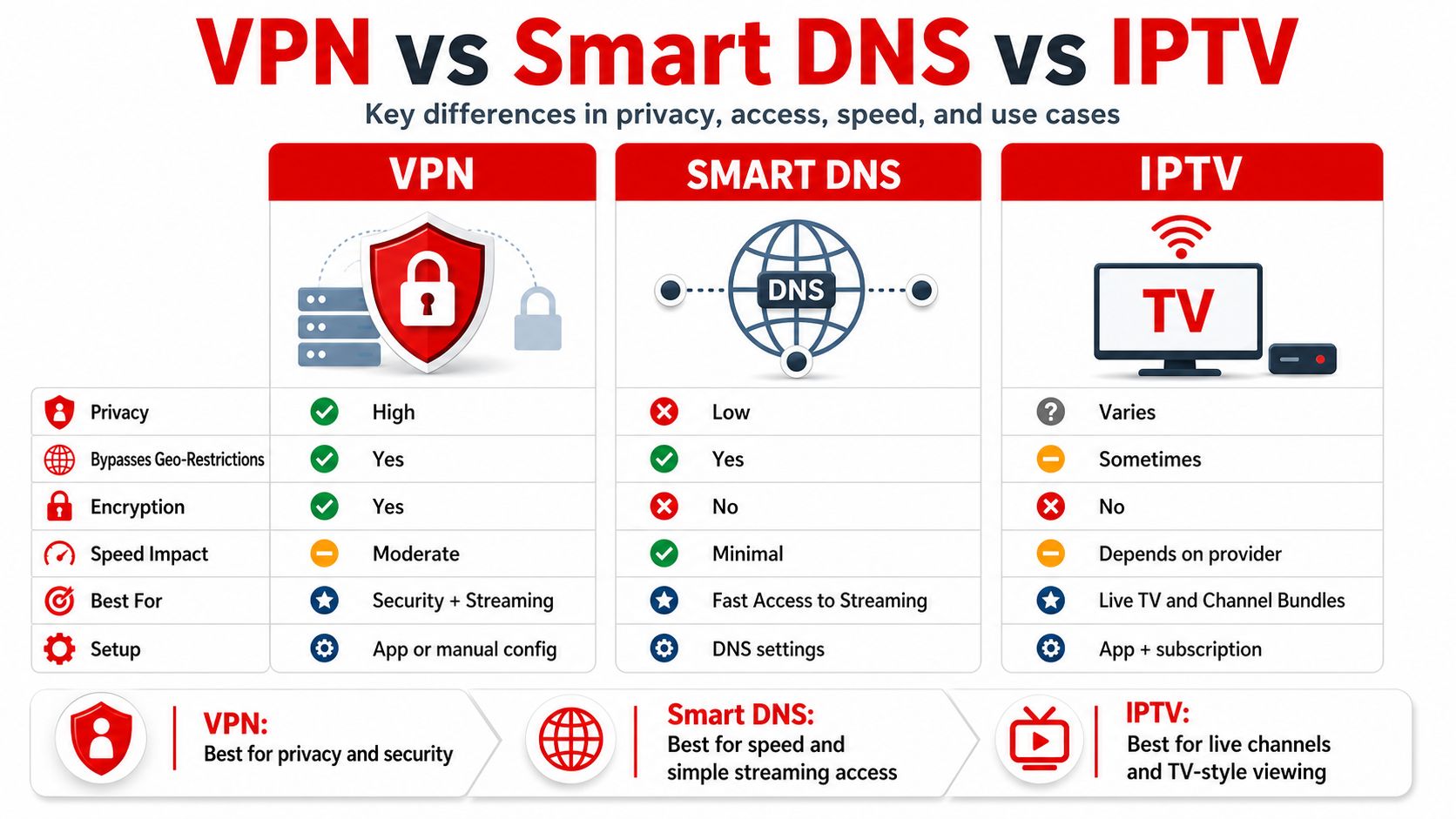
The cleanest way to compare the main routes is by asking what matters at 8pm when the stream is live and the family are already in the room. One method may be more private. Another may be faster. Another may be easier across multiple devices.
| Method | Setup Complexity | Live Sports Stability | Device Support | Privacy Protection | Typical Cost |
|---|---|---|---|---|---|
| VPN | Moderate | Usually good, depending on server load | Broad across phones, tablets, computers, Fire Stick, routers | Stronger, because traffic is encrypted | Subscription-based |
| Smart DNS | Lower once configured | Often fast, because it doesn't encrypt all traffic | Good, but setup can be awkward on some TVs | Limited compared with a VPN | Subscription-based |
| IPTV with built-in VPN | Varies by provider | Can be strong if the provider's network is stable | Often wide, but app and device support differ | Depends on provider design | Usually fixed-term or bundled |
Where VPNs fit best
TechRadar's 2026 comparison guide describes the standard path for UK TV abroad as connecting a VPN to a UK server before opening the streaming app or website (TechRadar guide). That method is still the most universal because it works across phones, tablets, computers, and even routers when the service supports it. It's the safest bet when you want broad compatibility and a simpler mental model, because the UK server is selected first and the app sees a UK IP address.
That said, VPNs can still feel a bit heavy for a living-room setup. A bad server choice can mean buffering, a blocked app can still recognise stale location data, and the experience depends on the quality of the provider's UK endpoints. For live football, I'd rather use a VPN with multiple UK servers than a cheaper option with one crowded endpoint.
Where Smart DNS fits best
Smart DNS is attractive because it's lighter and usually quicker to set up once the device is configured. It's useful if you mostly care about speed and don't need full encryption on every device in the household. The trade-off is obvious, it's a narrower tool, and it doesn't give you the same privacy protection as a VPN.
Where IPTV fits best
IPTV is a highly subjective choice. It can be appealing for households that want live channels, catch-up, and a single subscription-style workflow, but the core question is trust. You're relying on a third-party service to keep streams stable and account for device differences. If you're exploring a provider-led option, the practical details are usually easier to judge from the setup and device support pages, such as the overview at UK IPTV service options.
Setting Up Your Chosen Method on Real Devices
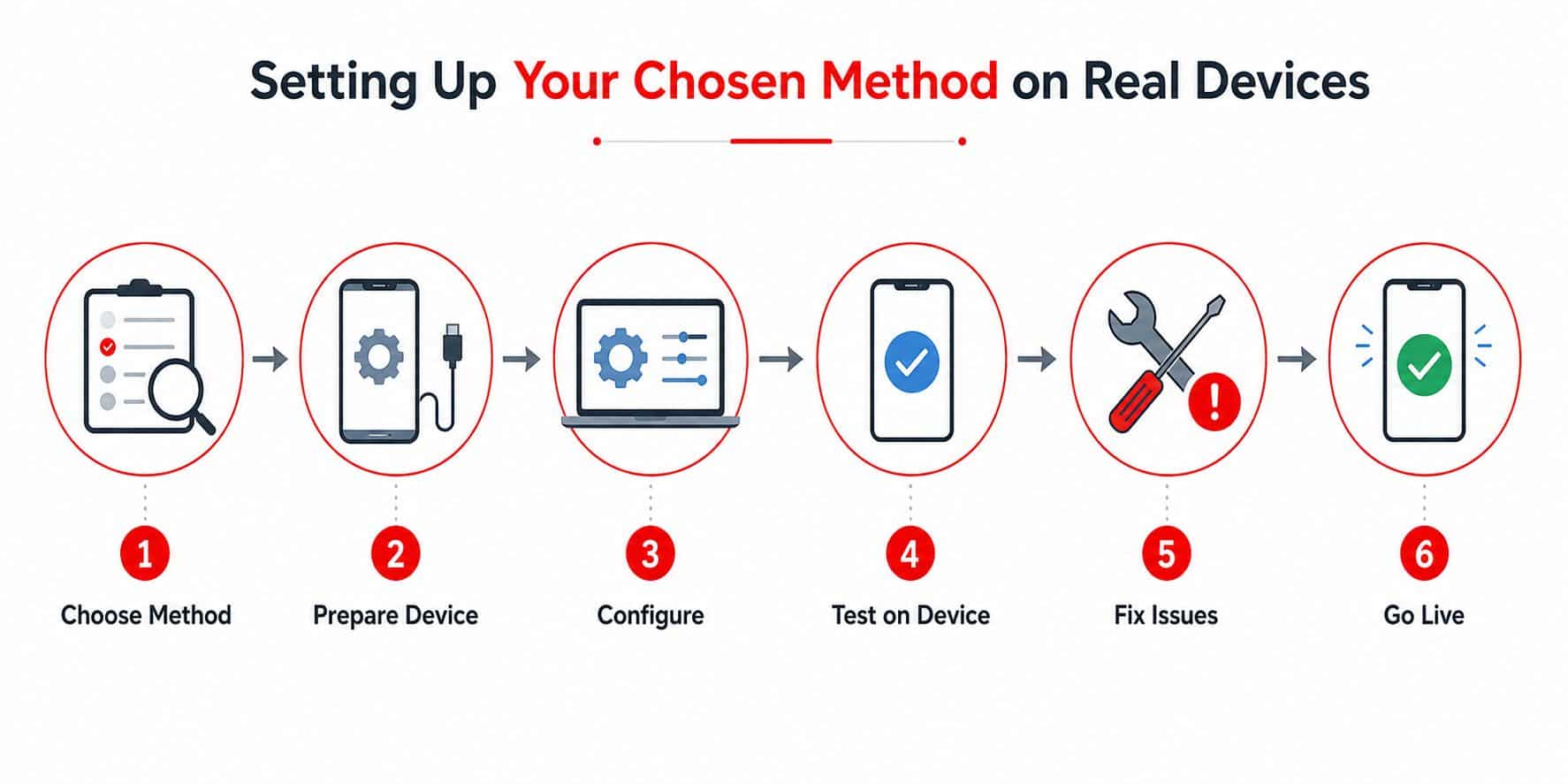
The biggest mistake is assuming every device behaves like a laptop. A Fire Stick, a Samsung TV, and an iPhone each get to fail in their own special way. That's why the setup has to match the hardware, not just the theory.
Fire Stick and Android TV boxes
Fire Stick is still one of the easiest living-room routes because the app ecosystem is friendlier than most smart TV platforms. Tom's Guide notes the basic VPN workflow plainly, sign up, connect to a UK server, then open the streaming app, including on Fire Stick (Tom's Guide). That sequence matters, because opening the app before the connection is active is a common way to trigger location checks too early.
On Android TV boxes, the same logic applies. Install the VPN app if the device supports it, pick a UK server, then open the broadcaster app. If the app isn't available natively, a browser route sometimes works better than forcing a cast.
Useful habit: test the setup before match day, because the first login is where cached location data and account prompts tend to show up.
Smart TVs and router-level workarounds
Samsung, LG, and Sony TVs often don't support full VPN apps in the way a Fire Stick does. In those cases, router-level protection or Smart DNS is usually the cleaner route. The upside is that the whole home network can appear to be in the UK, which avoids having to configure every television separately.
That broader approach is why many experienced users stop thinking in terms of one gadget and start thinking in terms of the whole household. If the TV can't run the app, the network has to do the work instead.
iPhone, iPad, and casting setups
On iOS devices, the app setup is straightforward, but casting can be where the problems start. Radio and Telly's older guidance highlights Android-to-TV mirroring and notes that Chromecast can complicate playback of downloaded iPlayer content (Radio and Telly). That's still relevant as a device-level warning, because cast paths sometimes behave differently from native playback and can break the experience you thought you had solved.
One setup resource and one practical shortcut
If you want a device-specific walkthrough rather than a one-size-fits-all answer, the setup library at UK Best IPTV setup guides is useful for checking how different players behave on different hardware. And if you're replacing a messy cable setup with streaming, how Premier Broadband supports cord-cutters is a useful reference point for thinking about network quality, device choice, and the practical habits that make streaming reliable.
What Changed in 2024 and 2025 for UK Expats
If you set up UK TV abroad the same way you did a few years ago, the weak points show up fast. The market now has more official subscriptions, more device-specific quirks, and fewer clean comparisons between “use a VPN” and “just subscribe.”
Official subscriptions shifted
British Expat Guide notes that BritBox UK was folded into ITVX Premium in late 2024, and that changed how many expats approach paid access to UK catalogues (British Expat Guide). People who once compared BritBox and ITV as separate options now have to look at a different bundle, a different app path, and a different set of limits on the device they use.
Which? also describes a paid route for ITV content abroad through ITV Hub+ in its guidance on watching UK TV abroad (Which? guidance on watching UK TV abroad). The branding is less important than the practical point, there are still official paths in some cases, but they are more fragmented than the old one-size-fits-all advice suggests.
The decision is more country-specific now
That makes the choice harder in a very practical way. The key question is no longer only whether a VPN works. It is whether an official subscription exists where you are, whether the price makes sense for your setup, and whether the app behaves properly on the device sitting under your TV.
The grey-market IPTV scene sits in the same decision tree. Some viewers accept it because the channel selection is broad and the setup can be simple once it is running. Others stay with official apps, catch-up downloads, or a VPN-based route because the legal comfort is clearer, even if the catalogue is narrower. The best choice depends on how much you care about ease, device compatibility, and how formal you want the whole setup to be.
Rule of thumb: if you are weighing a country-specific subscription against a workaround that has to run across multiple devices, test the device first, not the sales page.
The change in 2024 and 2025 was not about one service replacing everything else. It was about more bundled offers, more country-level exceptions, and more situations where the TV in front of you matters more than the theory. That is why current setup advice is more useful than old “just use a VPN” explanations. The decision is commercial as well as technical.
Troubleshooting Common Playback Failures
The stream that worked last night can still fail tonight. In practice, the cause is usually ordinary, and the fix is usually mechanical rather than mysterious.
When the app knows you're abroad
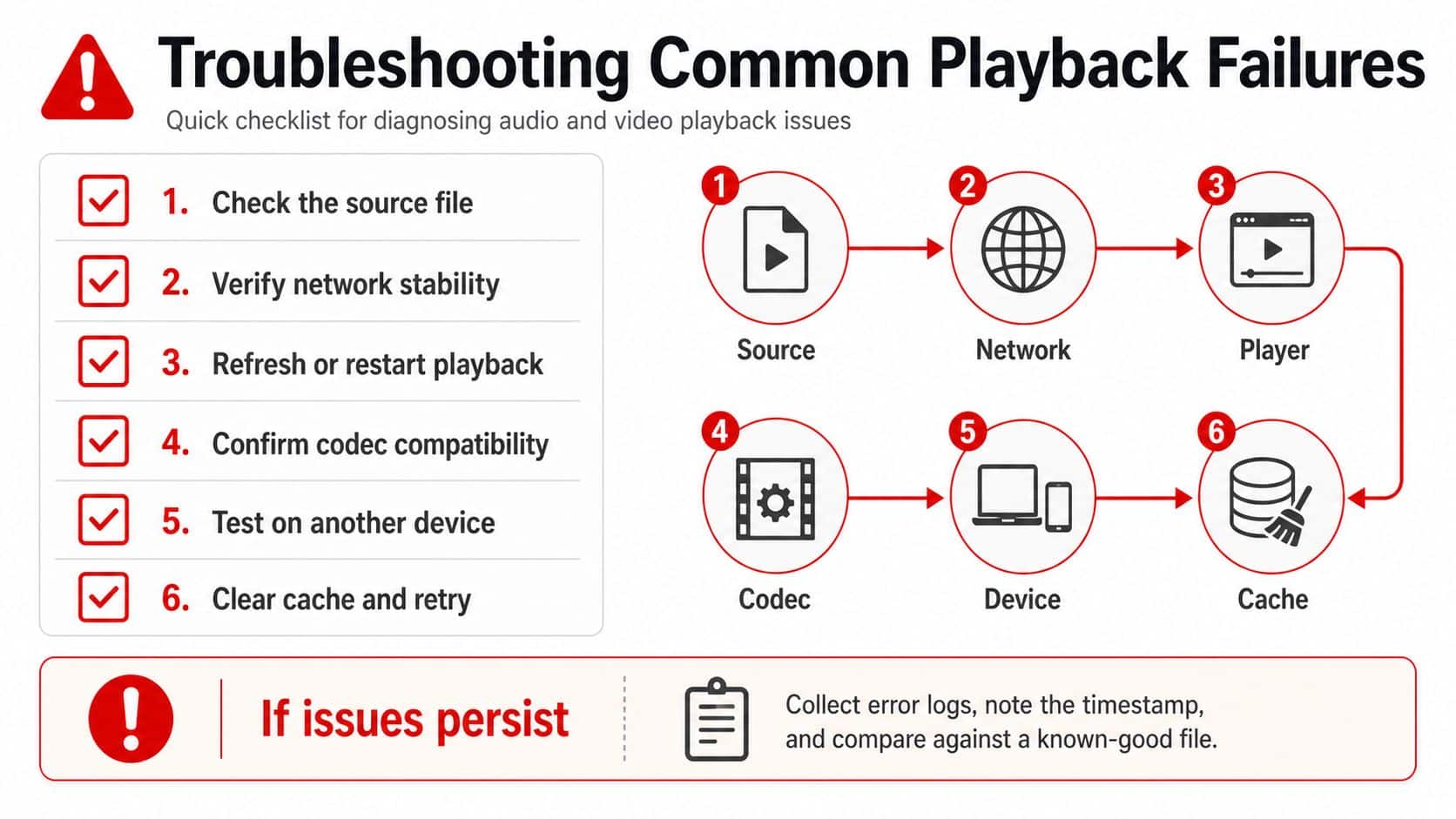
The quickest failure mode is a service that still recognises your location even after you have connected. In that case, switch UK servers first, then clear browser cookies and cache. That is the same practical fix highlighted in Gizmodo, and it matters because streaming platforms can hold on to old location signals long after the IP address has changed.
If one UK endpoint gets blocked, moving to another is usually faster than waiting for the first one to recover. The same logic applies after a failed browser session. Cookies and cache often keep feeding the login flow the wrong region, which is why the app can look “stuck” even when the VPN itself is connected.
When the stream buffers or drops
Live sports expose weak setups fast. Buffering usually means the connection is under pressure, the device cannot keep up, or both. Lowering stream quality can steady playback when the network is busy, especially on peak match nights when a Fire Stick, a phone, and a laptop are all competing for the same line.
If you are using Smart DNS or IPTV, test the stream on a second device before you blame the service. A clean result on one screen and a broken result on another usually points to the playback path, not the feed itself. That distinction saves time, because you can stop chasing the wrong fix.
When the device is the real problem
Some failures have nothing to do with geo-blocks. Chromecast quirks, app mismatches, and unsupported smart TV workflows can make a setup look broken even though the account and connection are fine.
The fix is often to simplify the route. If the native app is unreliable, a Fire Stick can be easier to live with, and router-level setup can remove the TV's own software from the equation entirely. That matters most on older smart TVs, where app support is patchy and firmware updates do not always help.
A practical order of operations
- Change server first. If a UK server fails, try a different UK endpoint before changing devices.
- Clear old location traces. Browser cache and cookies can keep pulling the wrong region into the session.
- Simplify the device path. Start with the native app, then try casting, then move to router-level setup if the TV is the weak point.
- Match quality to connection. Do not force the highest stream mode if the network is already under pressure.
- Check the service on a second screen. If one device works and another does not, the problem is probably local, not with the stream itself.
Some failures repeat across every device you own. At that point, the setup is the problem, not the user. If you are comparing subscription-style options as part of that reset, the current plan structure at UK IPTV subscriptions is worth checking against the device you use.
Choosing the Right Approach for Your Situation
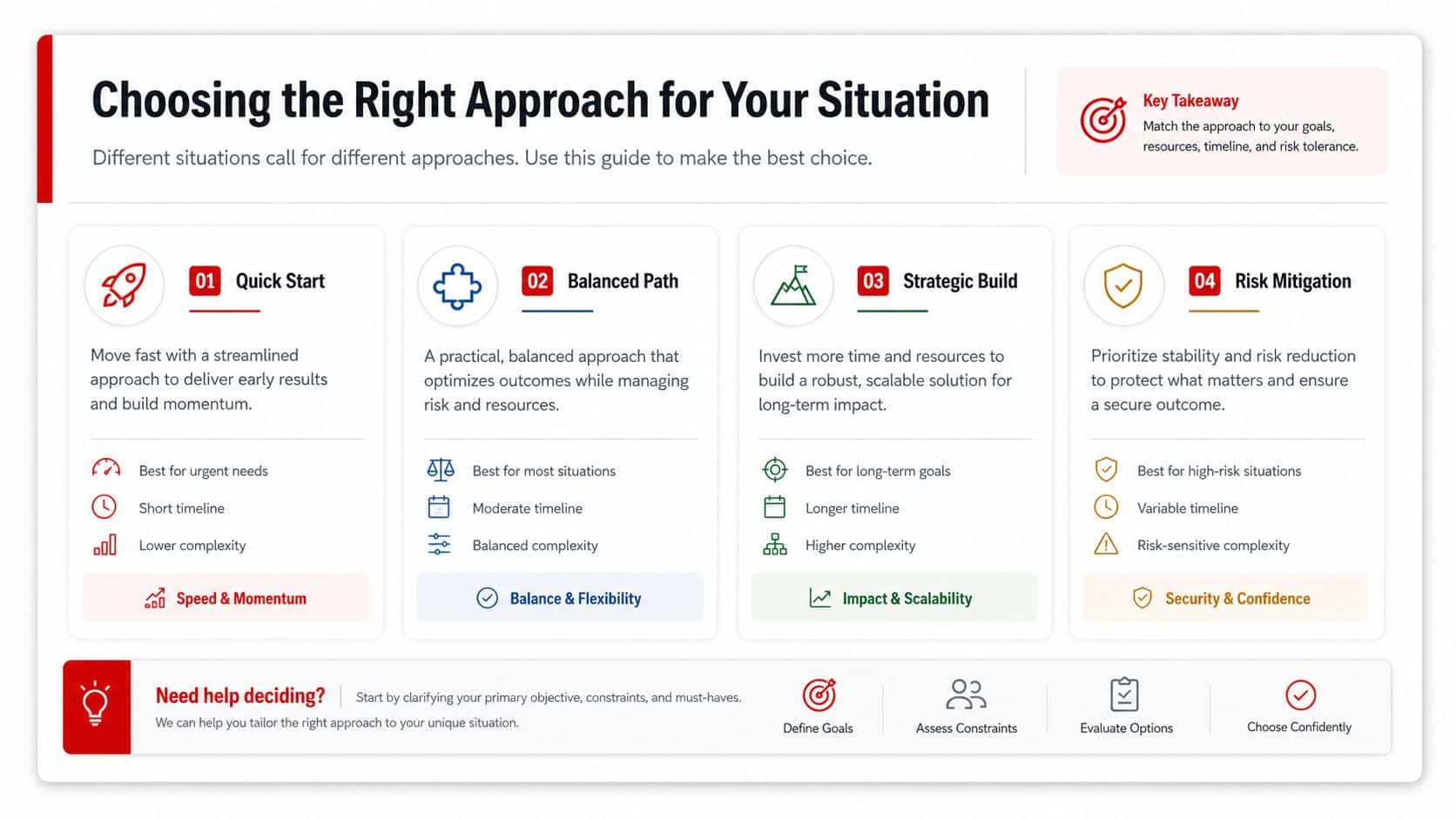
The right setup depends on three things, the device on your wall, the kind of TV you watch, and how tolerant you are of fiddly configuration. That sounds obvious until you're standing in front of a Smart TV that won't install the app you wanted and the kick-off timer is already running.
Match the method to the viewer
A football fan who wants the strongest Saturday setup usually benefits from a VPN on a Fire Stick or router, because that gives the broadest compatibility and the most control over UK server choice. A family that mostly wants kids' shows and films on demand can often live comfortably with downloads, Smart DNS, or a subscription route that favours library breadth.
A short-term traveller has a different job entirely. If you only need a few weeks of access, the fastest route is usually the one with the least setup overhead on your existing device. A long-term expat, by contrast, should think about the whole household, not just one app. For those comparing subscription-style options, the current plan structure at UK IPTV subscriptions is the kind of thing worth weighing against a pieced-together solution.
Use this quick decision check
If live sport matters most, prioritise stability and device compatibility. If on-demand matters most, prioritise convenience and download access.
- Pick a VPN if you want the most flexible route across devices and don't mind a little setup.
- Pick Smart DNS if speed matters more than privacy and your devices support the configuration cleanly.
- Pick IPTV if you want a bundled live and on-demand workflow and you're comfortable evaluating the provider carefully.
- Use downloads if you only need catch-up and your app already supports offline viewing.
The mistake is trying to find one method that wins every category. The better move is choosing the method that fits your actual device, your viewing habit, and your tolerance for setup friction.
If you want a more straightforward route than stitching together apps, servers, and device workarounds, take a look at UK Best IPTV. It's built for people who want UK live TV and on-demand access on real devices without wasting a Saturday night on setup guesswork.
Enhanced by Outrank