

You're in a very ordinary UK situation: the satellite bill keeps creeping up, the smart TV in the front room already has streaming apps built in, and someone in the house has probably said, “Do we still need the dish?”. IPTV in the UK sits right in that decision. It's not a magic new box, it's television delivered over your internet connection, and the key question is whether your broadband, your device, and your provider can keep up with how your household watches TV.
Table of Contents
- What IPTV Actually Means for UK Households
- Why IPTV Matters in the UK Right Now
- IPTV Compared to Cable and Satellite
- Choosing a UK IPTV Provider That Delivers
- Setting Up IPTV on Firestick, Smart TVs, and Mobile
- Getting Stable 4K Playback on UK Broadband
- The Legal Picture UK Viewers Should Understand
- Troubleshooting and Your Next Steps in the UK
What IPTV Actually Means for UK Households
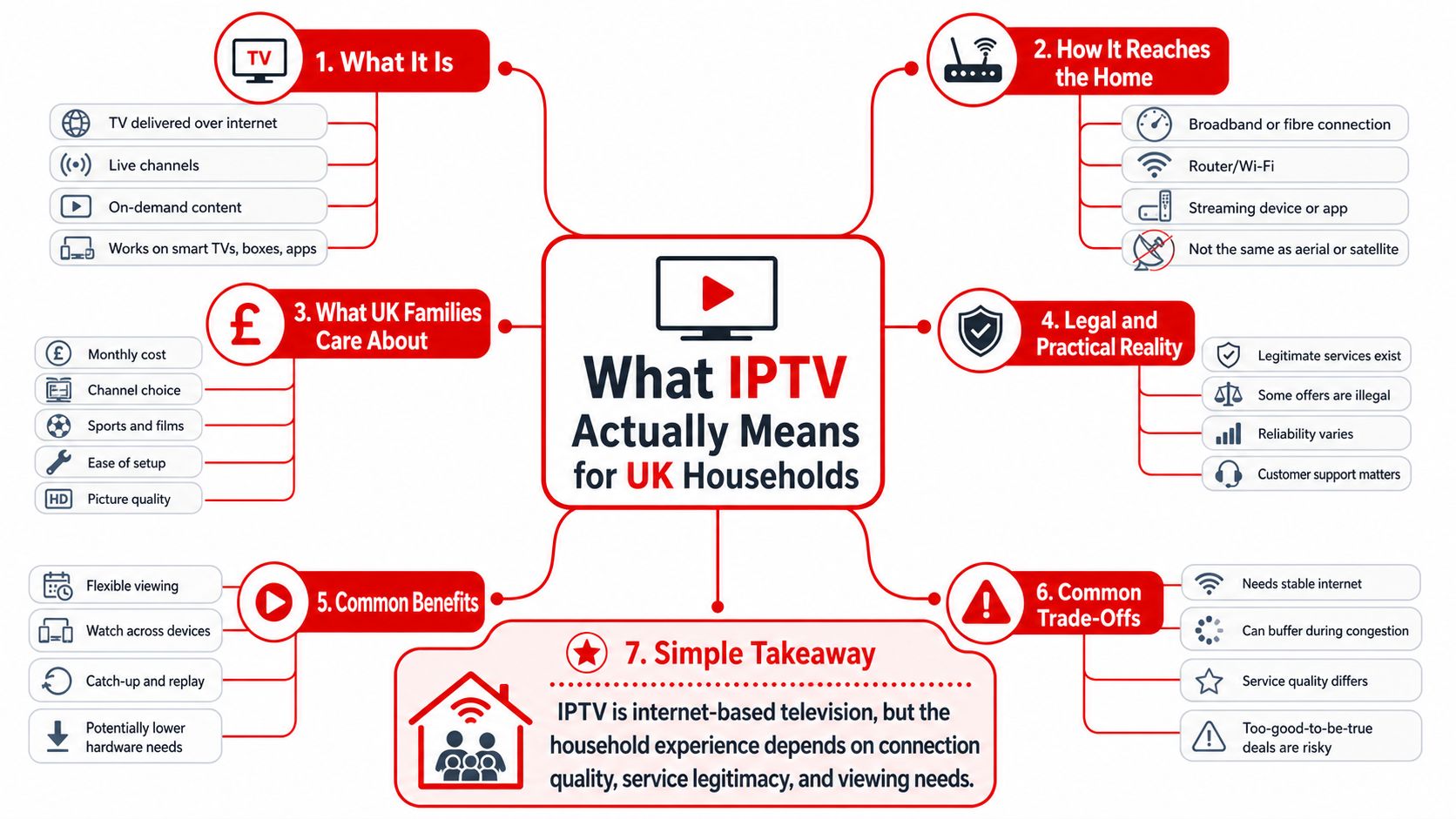
A family in Manchester can keep paying for satellite, or they can decide that the broadband they already pay for should carry the TV instead. That's the basic IPTV question. IPTV means Internet Protocol Television, which is television delivered over the internet rather than through a satellite dish or coaxial cable.
The moving parts behind the screen
Many see one app and assume that's the whole service. It isn't. There's usually a provider who sells access, a server that holds the channel feed and video library, a playlist or M3U link that tells the app what to load, and an app such as IPTV Smarters Pro or TiViMate that displays everything on your Firestick, TV, phone, or tablet.
Practical rule: if one of those parts is weak, the whole experience feels shaky, even when your internet speed looks fine.
A useful way to think about it is a restaurant menu. The menu is the playlist, the kitchen is the server, and the waiter is the app. You do not eat the menu, you use it to reach the food, and that is why a good-looking channel list means very little if the server behind it is overloaded.
IPTV is also a delivery model, not one single product. A broadcaster can use it for live channels, a sports platform can use it for match coverage, and a smaller provider can package UK and international channels into a subscription. The quality you get depends less on the label “IPTV” and more on how the provider handles streams, device support, and peak-time load.
For UK households, that makes IPTV part of normal modern viewing rather than a side project for hobbyists. If your family already uses catch-up apps, streamed box sets, and smart TV platforms, IPTV is just the live-TV version of that same internet-first habit.
Why IPTV Matters in the UK Right Now
The UK is moving towards IP-based television in a way that matters for ordinary homes, not just policy teams. A UK government stakeholder forum paper says that, in a potential transition to an IP-only television environment, the majority of UK households are expected to be using IP-based services by 2034. That projection is important because it tells broadcasters, internet providers, and device makers where the market is heading, and it tells viewers that IPTV is not a temporary workaround.
Why this feels different in 2026
Television used to be shaped by the signal source first. Now it is shaped by the network first. Smart TVs, streaming sticks, and broadband-connected set-ups have changed what people expect from live TV, because they want the same service on the living-room screen, the bedroom TV, and sometimes a phone or tablet as well.
That is why IPTV matters now. It fits the way households already use entertainment devices, and it sits naturally alongside catch-up and on-demand services. The technical shift is not just about convenience. It is also about where the industry is putting effort, from app design to server delivery to channel access.
The practical effect is simple. If you are choosing a TV service in 2026, you are not comparing old and new in a neat line. You are comparing different ways of getting television over the same broadband connection, while the UK's broader distribution model keeps moving in the same direction.
The question is no longer whether internet delivery belongs in TV. It already does. The real question is how well a service performs in your home at the times you actually watch.
That is why readers should treat IPTV as a mainstream option, not a novelty. The 2034 horizon is a reminder that the market is being reorganised around IP delivery, and households that understand the basics now will make calmer decisions later.
IPTV Compared to Cable and Satellite
The easiest way to judge IPTV is to place it beside the two older delivery models most UK viewers already understand. Cable and satellite still have their place, but they come with different trade-offs around hardware, contracts, and flexibility. IPTV changes the shape of those trade-offs because it rides over broadband rather than a dedicated broadcast path.
| Factor | IPTV | Cable | Satellite |
|---|---|---|---|
| Delivery | Internet-based | Network or cable infrastructure | Dish-based broadcast |
| Setup | App and credentials on supported devices | Operator hardware and installation | Dish, box, and installation |
| Flexibility | Works across many devices | Usually tied to provider hardware | Often tied to a set-top box and dish |
| Content access | Live TV plus on-demand, depending on provider | Live TV and on-demand through the operator | Strong live-TV heritage, on-demand varies |
| Weather sensitivity | Depends on broadband quality | Usually steadier than wireless links | Can be affected by poor weather |
| Best fit | Homes that want app-based TV on existing devices | Households that prefer managed service bundles | Homes that already rely on dish reception |
What people tend to gain
IPTV usually feels lighter to manage. You do not need the same level of hardware commitment, and the service can often be used on a Firestick, smart TV, phone, or tablet with the same login. That makes it attractive for families who already own several connected devices and do not want to pay for extra boxes.
Cable and satellite can still offer a more familiar, managed experience. If a household wants one provider, one engineer visit, and one support number, that simplicity has value. But the trade-off is often reduced device freedom and a setup that feels less flexible if viewing habits change.
What people tend to give up
With IPTV, the burden shifts onto the internet connection and the provider's server quality. If the app is poor, the playlist is overloaded, or peak-time resilience is weak, the whole experience suffers. Cable and satellite do not remove every problem, but they can hide some of the networking complexity from the viewer.
Good comparison test: ask which system keeps working when more than one person in the house wants different screens, different content, and different rooms.
For many UK households, the answer now comes down to whether they value hardware-managed TV or app-based TV. IPTV is usually the more flexible route, but only if the provider and broadband can support the way the household watches.
Choosing a UK IPTV Provider That Delivers
A provider page can look impressive and still disappoint at 8pm on a Saturday. That is why the test is not the sales copy, it is the service design behind it. Start with the channel mix, because UK-focused viewers usually care about whether the line-up reflects the channels they watch, not just how long the list looks.
What to check before you pay
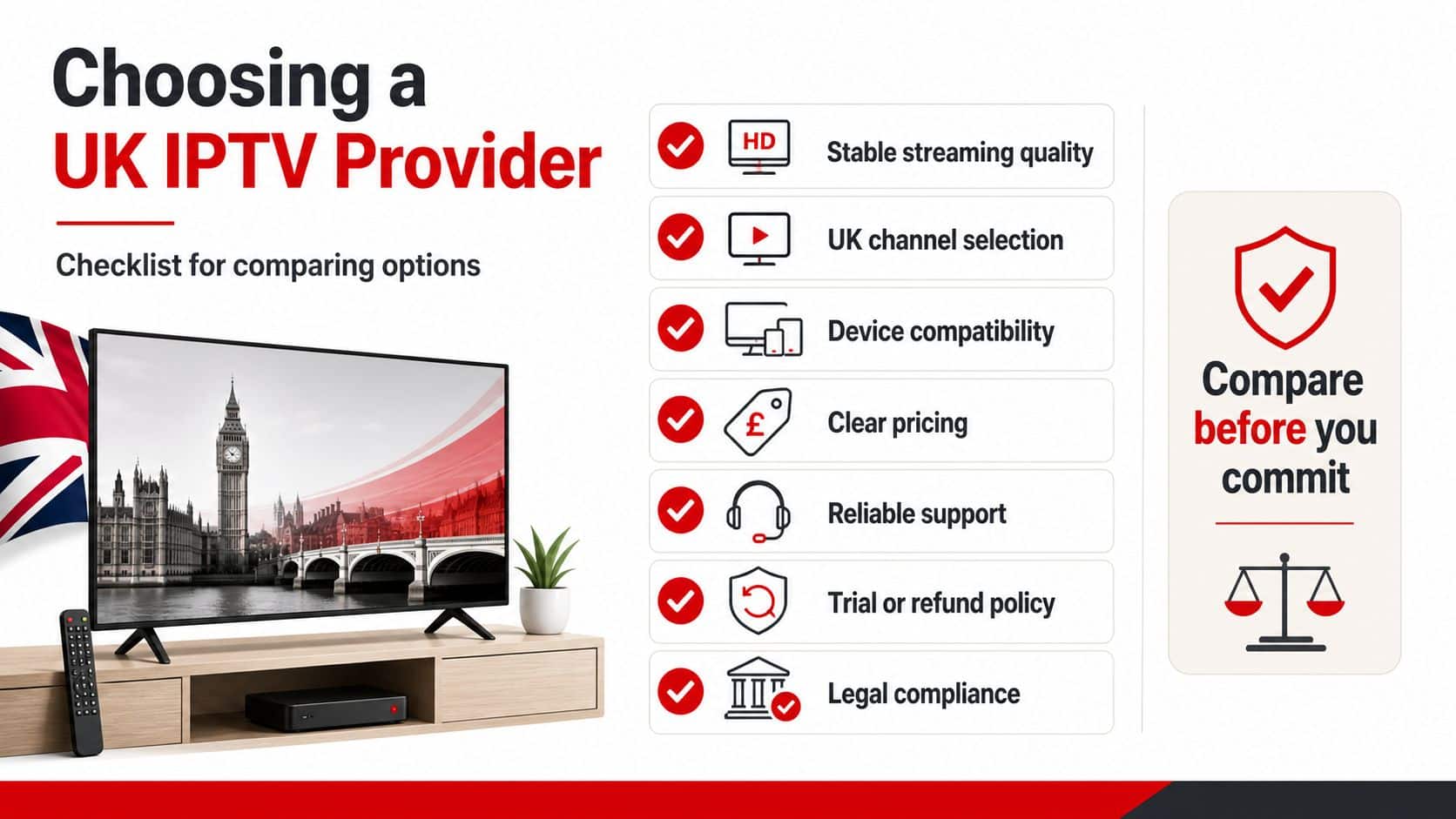
Look at these areas in order, because they reveal different kinds of quality:
- Channel line-up: Check whether the provider focuses on UK channels, international channels, or both.
- VOD depth: A large film and series library matters less if it is poorly organised or missing subtitles.
- EPG accuracy: The electronic programme guide should match what is on air, not just display empty slots.
- Catch-up support: If you miss a programme, a sensible catch-up window saves time.
- PPV access: Some viewers care about live events, others do not. Know which camp you are in.
- Support quality: If something breaks, you want a human response that is usable.
A good provider also behaves like a service business, not just a checkout page. Trial access, clear refund terms, recognised payment methods, and simple renewal rules all matter because they reduce friction if the service is not a fit. If a provider makes it hard to understand what you are buying, that is a warning sign.
The technical side matters too. Load-balanced servers, stable peak-time delivery, and sensible anti-freeze design are the phrases to listen for, because they speak to what happens when football starts and thousands of people press play at once.
The easiest way to test those claims is with a short trial during a busy evening. A weekend match or a prime-time film slot tells you far more than a quiet daytime demo. If the stream stays smooth, the guide is accurate, and login is simple, you have learned something useful before committing.
The provider page at UK Best IPTV is one example of the kind of information to inspect, but the same checklist applies to any service you are comparing.
A provider should answer these questions plainly
Can I get a trial, do the channels load quickly, and does the service still behave when the house is busy?
If the answer is vague, keep looking. The best sign of a solid provider is not hype, it is clarity.
Setting Up IPTV on Firestick, Smart TVs, and Mobile
The setup usually begins the same way, whatever device you use. The provider sends credentials, often including a server URL or M3U link plus a username and password, then you enter those details into an IPTV app. In many cases the channel list appears quickly after login, so the difference between a trial and a full subscription is mostly the level of access, not the basic setup flow.
The usual setup path
On a Firestick, people commonly install an IPTV player such as IPTV Smarters Pro or TiViMate, then paste in the provider details. On Samsung and LG smart TVs, the process can be similar if the app is available for that platform, though some households find an external streaming stick simpler because app support is more predictable.
Android boxes, phones, and tablets are usually straightforward because the app ecosystem is broader. Apple users can also run IPTV on iPhone, iPad, and Apple TV, although the exact app choice may differ from Android. The important point is not the brand name of the device, it is whether the provider has clear setup guidance for it.
If you prefer a walkthrough, the setup guides are useful because they cover more than one player and platform instead of assuming every home looks the same.
A few device habits that save time
- Use the simplest supported app first: Fancy features are pointless if the basic login fails.
- Check the subscription type: A 24-hour trial is for testing, while a full plan should provide access to the same type of content with active credentials.
- Wait for the channel list to populate: Don't assume the app has failed after the first few seconds.
- Set household controls early: If the service includes a built-in VPN or parental PIN, switch those on before handing the login to other people.
The quick activation model is one of the main differences between IPTV and older TV installs. You are not waiting for a dish, a technician, or a formal box swap. You are usually waiting for details to land in your inbox or WhatsApp, then you are loading them into the right app.
For most homes, the hardest part is not the technical login. It is choosing the app that feels least clunky on the device you already use every day.
Getting Stable 4K Playback on UK Broadband
A lot of buffering arguments start because people compare the wrong thing. They look at a broadband speed test, see a healthy number, and assume every stream should behave perfectly. IPTV is more specific than that. The stream quality depends on the type of content, the number of simultaneous streams, the connection path, and the provider's own server load.
Start with the numbers that matter
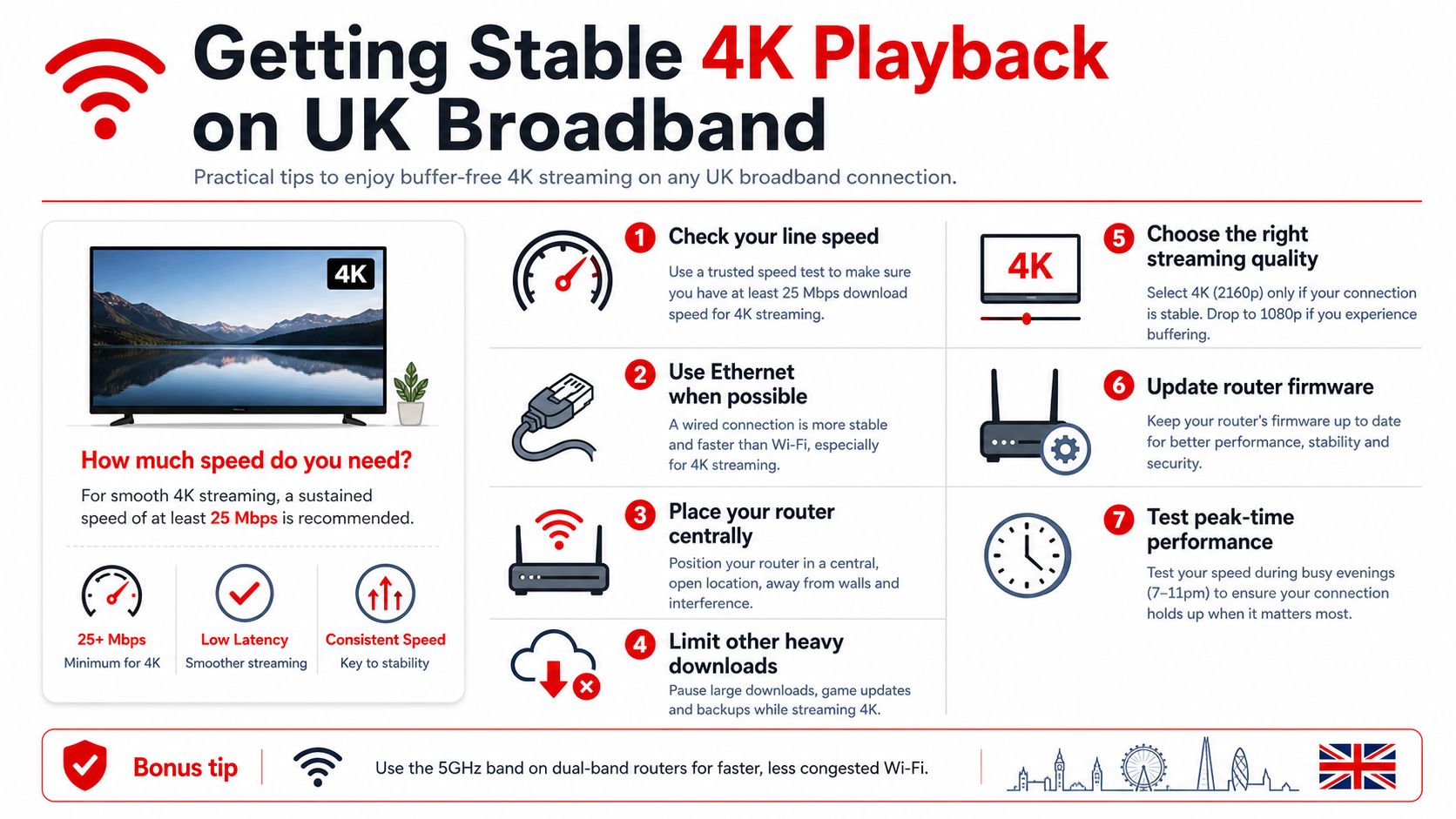
Independent UK guidance places SD at 3 to 5 Mbps per stream, HD at 5 to 10 Mbps per stream, and 4K at 25 Mbps or more per stream. UK-oriented commentary also notes that 25 Mbps is a common minimum recommendation for smooth 4K streaming. For a household running one 4K stream and one HD stream, that means budgeting well above the bare minimum so the player has room for retransmissions and adaptive bitrate changes. IPTV UK guidance on stream bandwidth and Wi‑Fi stability
Connection quality beats raw theory
Wired Ethernet is usually more stable than Wi‑Fi, because it avoids the extra interference and variability of wireless links. If cabling is not practical, 5 GHz Wi‑Fi is the better wireless choice compared with 2.4 GHz. That difference shows up most clearly when the living room is crowded with devices and the connection is under pressure.
Live sport is the most punishing test. Fast motion, camera pans, and crowd movement give the codec less room to hide weaknesses, so a stream that seems fine for a film can still break up on a match. That is why people comparing home networking options for gaming can find the same basic principle useful, and this gaming connection benchmarks guide is a helpful reference point for thinking about latency-sensitive traffic.
What to do before the first big event
Run a speed test on the device you will use, not just on a laptop in another room. If the result is close to the bare requirement for your chosen stream, you do not have much headroom left when the household gets busy in the evening. If the provider includes integrated VPN features, use them where appropriate, especially if your connection behaviour changes during peak hours.
Simple rule: the right test is not “can it play once?”, it is “does it stay smooth when the house is active?”
The Legal Picture UK Viewers Should Understand
A lot of people ask whether IPTV is legal in the UK, and the honest answer is that the technology itself is not the issue. IPTV is just a way of delivering television over the internet. The legal question is whether the provider has the rights to distribute the channels and on-demand content it is selling.
That distinction matters because there is a clear difference between licensed services operated by broadcasters or authorised platforms, and unauthorised services that rebroadcast content without permission. Ofcom's role sits in the wider broadcasting and communications framework, but the basic consumer check is simpler than many people expect: look for transparent pricing, proper terms, recognised payment methods, and a real support presence in the UK.
Red flags that deserve attention
If a service hides its ownership, makes payment look improvised, or offers no meaningful terms, step back. If it leans on vague promises instead of clear access details, that is another warning sign. A provider should be able to explain what you are buying without turning the conversation into a sales chase.
The same caution applies if you are trying to use IPTV while travelling or living outside the UK. A provider may include international access features, but the licensing position still matters, and the practical support path should be easy to verify. The guide to watching UK TV abroad is useful context for people dealing with location and access issues.
If your home network is weak, fixing Wi‑Fi coverage is still worth doing before you blame the IPTV service. A practical home WiFi coverage guide can help you separate a network problem from a provider problem.
The bigger point is that the UK's move towards IP delivery makes this distinction more important, not less. As television becomes more internet-shaped, viewers need to know whether they are buying a licensed service or a rebroadcast they may not be entitled to use.
Troubleshooting and Your Next Steps in the UK
Buffering usually has a boring cause. The stream can't get enough data, the app is struggling, or the home network is busy. Start with the simplest fix first, because that saves time and often solves the problem before you start changing settings.
The quickest fixes for common problems
- Buffer loops: Check the device connection, switch from Wi‑Fi to Ethernet if you can, then restart the router.
- Missing EPG data: Refresh the guide in the app, then confirm that the provider's channel list is fully loaded.
- Audio dropouts: Test another channel or another app, because the issue may sit in playback rather than in the stream itself.
- App crashes: Clear the app cache or reinstall it, especially after updates.
- Login errors: Recheck the username, password, and server details exactly as supplied by the provider.
The next steps that keep the process calm
Start with your broadband, not the subscription page. If your connection is already strained, fix that first, or at least understand where the weak point is. Then shortlist providers using the checklist above, run a 24-hour trial during evening peak hours, and only subscribe longer once the live-sport test has passed.
Install the right app for your device, keep the login details tidy, and confirm the household features before sharing access. That means checking whether you want parental PIN protection, built-in VPN tools, or both.
The learning curve is shorter than expected. Once the setup is stable, the first proper match night or boxset binge usually shows whether you chose well.
If you want a straightforward way to compare options without getting lost in hype, take a look at UK Best IPTV. It offers a UK-focused IPTV service with setup guidance, device support, and trial access, which makes it a practical starting point for households that want to test IPTV properly before committing.
Crafted with the Outrank tool