

30 Mbps is enough for reliable IPTV in the UK, but the failure point is usually evening peak congestion, not headline speed. If your streams wobble at 8 to 10 pm, you're probably dealing with the access line, the router, or the device, not a mythical lack of “fast enough” broadband.
You can have strong coverage on paper and still get a bad viewing experience in practice. Ofcom's Connected Nations 2024 confirms 98% superfast broadband coverage in the UK, and DSIT's guidance puts mainstream IPTV service thresholds at about 5 to 7 Mbps for HD and 24 to 25 Mbps for UHD/4K. The catch is simple, when the line is busy or the app can't keep up, adaptive streaming drops picture quality before it starts outright buffering. DSIT's IPTV infrastructure guidance
Table of Contents
- What IPTV Delivers to a UK Home
- The UK Legal Picture Every Buyer Should Understand
- Streams Codecs and Resolution Without the Jargon
- Matching IPTV to the Device You Already Own
- How to Evaluate a UK IPTV Provider Before You Pay
- Choosing the Right Setup for Your Viewer Profile
- Fixing the IPTV Problems UK Viewers Hit
What IPTV Delivers to a UK Home
At 9 pm, a stream usually fails for a practical reason, not a mysterious one. Too many packets are trying to move through the same household path at once, and the player starts dropping quality to keep playback going.
IPTV delivery depends on several network points working together in your home. The content origin server sends the feed, the ISP network carries it into the house, your home router distributes it, and the streaming app on the TV or box has to keep up. If any part of that chain slows down, the picture follows, first with lower quality, then with buffering, then with a cut-off.
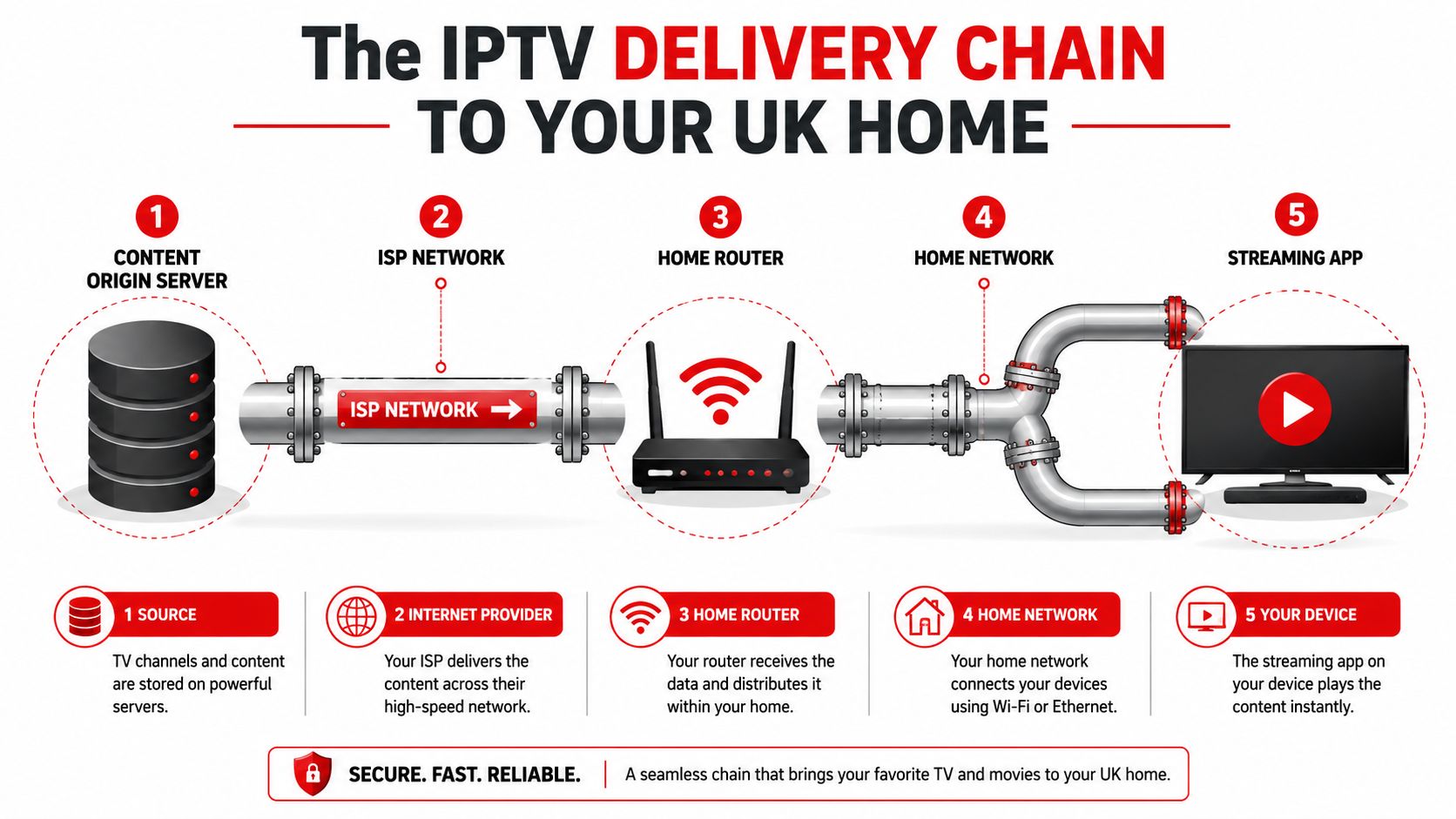
IPTV is not the same thing as Freeview or satellite
Freeview is broadcast television, it arrives over the air. Satellite comes from a dish. IPTV arrives over broadband, which is why household network behaviour matters far more than it does with old-school broadcasting.
That difference shows up in everyday use. BBC iPlayer and ITVX are catch-up apps with licensed on-demand delivery. IPTV goes wider than that, because it can carry live channels, catch-up, and on-demand video in one interface, but the quality you get still depends on the provider's stream feed and your network path. For people who want to watch UK TV abroad, the delivery chain changes again, which is why a setup that works at home can behave differently overseas. Watch UK TV abroad with the right setup
Practical rule: if one TV in the house streams cleanly but another buffers, the problem is usually the device, the Wi-Fi path, or the app, not “the internet” as a whole.
The UK angle matters here. DSIT's guidance says 30 Mbps is sufficient for reliable IPTV, but that is a household headline, not a guarantee for every screen at once. If several people are streaming together, the access line has less spare headroom, so a home with good download speed can still perform badly when the neighbourhood is busy. DSIT's IPTV infrastructure guidance
The UK Legal Picture Every Buyer Should Understand
Most UK IPTV pages dodge the issue, which is not whether IPTV exists, but whether the service is licensed. That distinction matters because legitimate IPTV products and unlawful channel-restreaming services can look similar from the outside, yet the legal and consumer-risk profiles are completely different.
Licensed services are the easy category to recognise, they operate with rights in place and have normal consumer recourse. Unauthorised services are the ones to treat cautiously. If they sell huge channel bundles, hide their ownership, and rely on vague promises rather than clear complaint handling, you're already in a risk zone.
What enforcement tells you
The UK has not been passive about this. In 2024, the Police Intellectual Property Crime Unit said it had disrupted more than 30 illegal IPTV services, and the UK's Operation CHOICE target was associated with around 40,000 identified users in the 2024 phase of the crackdown. Those figures don't tell you everything about legality, but they do show that the enforcement environment is very real. The UK enforcement context around IPTV
The practical buyer test is straightforward. Ask whether the provider is licensed, how complaints are handled, and what happens if payment is taken but access disappears. If the answers are evasive, that's a red flag.
- Licensing clarity: a legitimate provider can explain what's licensed and what isn't without slipping into marketing fog.
- Complaint route: there should be a real support path, not just a disappearing chat account.
- Payment protection: you want payment methods with dispute options and records.
- Service continuity: if the provider vanishes, you need to know whether refunds or chargebacks are realistic in your payment channel.
If you want to check how buyers are thinking about UK access while travelling, the practical framing in watching UK TV abroad is useful, because it makes the legal distinction clearer than most comparison pages do.
If a service is obsessed with “all channels, all sports, no questions asked”, you should ask more questions, not fewer.
Streams Codecs and Resolution Without the Jargon
Codecs and resolution sound technical, but the screen tells you the truth. A stream can be labelled 4K, yet still look soft if the app, the box, or the line can't handle the feed properly. The reverse happens too, a decent HD feed can look great if the player is efficient and the buffer is healthy.
The terms that actually matter
Codec is the compression method. H.264 is common and widely supported, while H.265 is more efficient and often better for higher resolutions on limited bandwidth. Adaptive bitrate means the stream can step down in quality when conditions get worse, so playback continues instead of freezing.
Resolution is the picture size, so HD, FHD, and UHD/4K describe different levels of detail. If your TV is only 1080p, a 4K feed doesn't magically turn the panel into a 4K display, but it can still waste bandwidth if the app or provider keeps pushing a heavier stream than the device needs.
Simple check: if a channel claims 4K but your TV, box, and network don't all support it cleanly, you're paying for strain you don't need.
Read the spec sheet like a buyer, not a marketer
A provider's spec list should answer one basic question, can the stream quality match the device you own? If it can't, the listing is mostly decoration.
A useful way to compare pricing structures is to think about packaging and delivery together. The framing in compare hybrid subscription pricing is handy here, because IPTV plans often bundle different levels of access, device support, and term length in ways that look cheap until you inspect the actual feature mix.
If your device doesn't decode the codec well, the line speed won't save you. If the player's buffer is too small, even a fast fibre line can still hiccup on live content.
Matching IPTV to the Device You Already Own
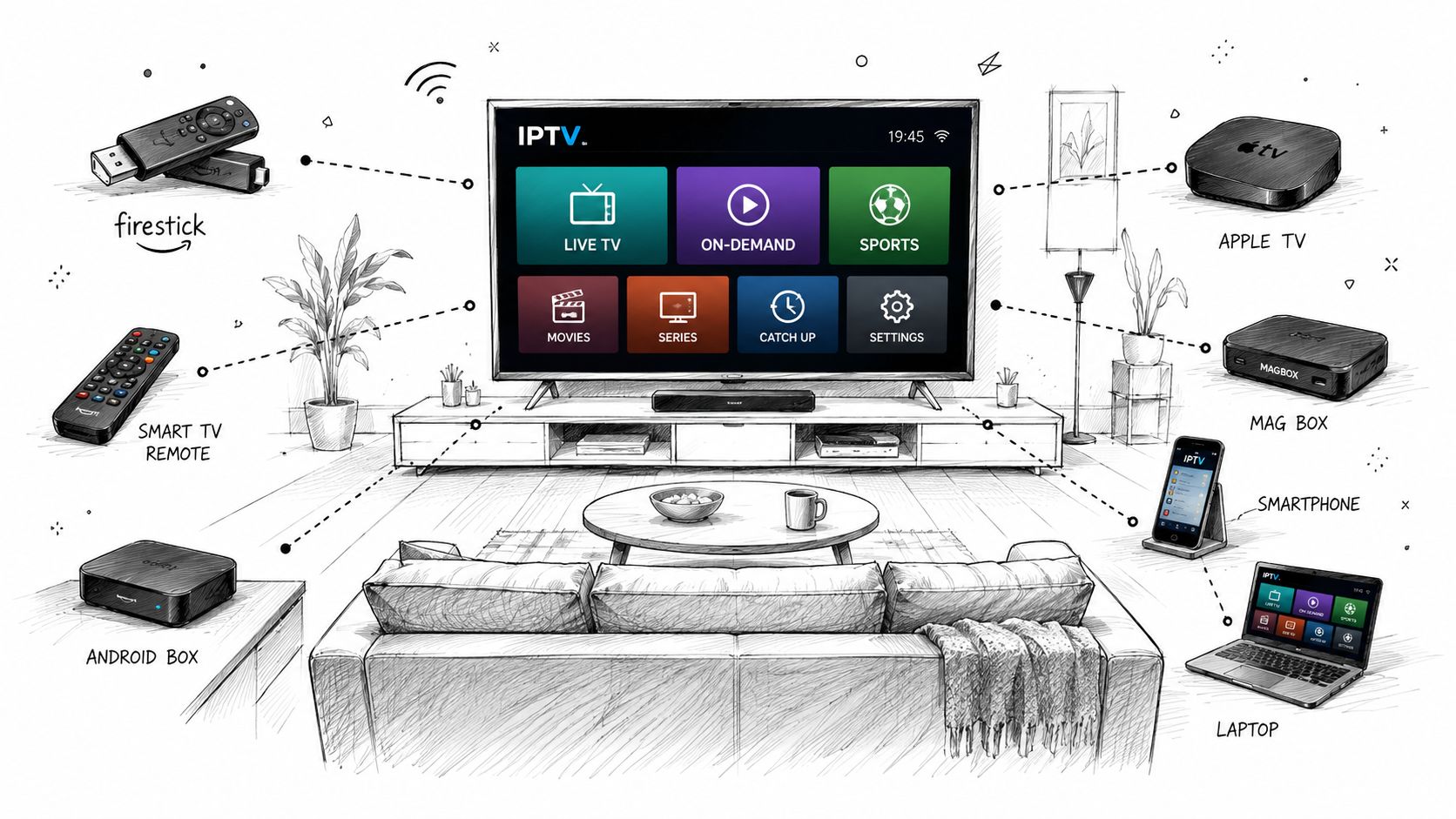
The device you already own matters more than most buyers admit. Fire TV sticks are popular because they're cheap, flexible, and easy to reset when a player misbehaves. Smart TVs are tidy, but the app stores can be awkward, and not every good IPTV player is available on every brand.
What I'd pick first
For most UK homes, a Fire TV Stick is the safest starting point. It's cheap, familiar, and easy to swap if an app update breaks something. A Fire TV Cube is better if you want smoother navigation and a more responsive box for heavier app use.
Samsung, LG, and Sony Smart TVs are fine if you value simplicity, but they can be frustrating when the app store doesn't carry the player you want. Android TV boxes are the most flexible if you like more control, while Apple TV is polished but more restrictive about what you can sideload and how you manage players.
The awkward ones and the useful ones
MAG boxes still appeal to people who want a portal-style setup, but they're locked into specific workflows and won't suit everyone. iPhone and iPad users can stream, but the experience is often less forgiving with background behaviour and app handling. PC and Mac are underrated because they're excellent for testing a service before you commit to a living-room setup.
For setup steps, the most useful starting point is these setup guides, because device choice matters more than most “best IPTV” lists admit. If you're comparing hardware and want a more gadget-first view, DigiDevice's 4K TV box guide is worth reading before you spend money on a box you don't need.
My blunt take is this, don't buy new hardware first unless your current device is weak. Test on the TV or stick you already have, then upgrade only if the app, codec support, or buffering behaviour proves the device is the bottleneck.
How to Evaluate a UK IPTV Provider Before You Pay
Stop asking whether a provider is “the best” and ask whether it can survive scrutiny. You can verify a lot in ten minutes if you know what to ask, and most weak providers collapse under specific questions.
The six questions that matter
| Criterion | Question to ask | Good answer signal |
|---|---|---|
| Channels | Do you carry the channels I actually watch, and can you name the main UK sports and entertainment groups clearly? | A direct list, not fuzzy claims |
| VOD quality | How does the on-demand library look on the device I use, and is playback consistent? | Clear examples, not just a big number |
| Uptime proof | How do you describe performance during peak evening and live sports windows? | Plain language about peak handling |
| Trial | Can I test the service before paying? | A real trial with no pressure |
| Payment | What payment methods are available, and what protection do I have if access fails? | Methods with traceable records |
| Support | If something breaks, how do I reach a human and how fast do they respond? | A direct support channel, not a ghost inbox |
Ask the question exactly this way
Don't ask, “Is it reliable?” That invites marketing fluff. Ask, “What happens during live sports at peak UK evening time, and can I test that before buying?” A solid provider will answer plainly, because it knows users care about playback, not slogans.
You should also ask what happens if the provider changes server locations or updates its app setup. If the answer is vague, you're buying uncertainty. If it points you to a proper plan page, for example subscription options, that at least gives you something concrete to inspect.
Best sign: the provider answers like a support team, not like a sales page.
The checklist is simple on purpose. If a service fails two or three of these questions, don't rationalise it, move on.
Choosing the Right Setup for Your Viewer Profile
A sports fan in Manchester, an expat in Spain, and a household with three TVs do not need the same setup. The right answer depends on how often you watch, what you watch, and whether you care more about convenience or picture quality.
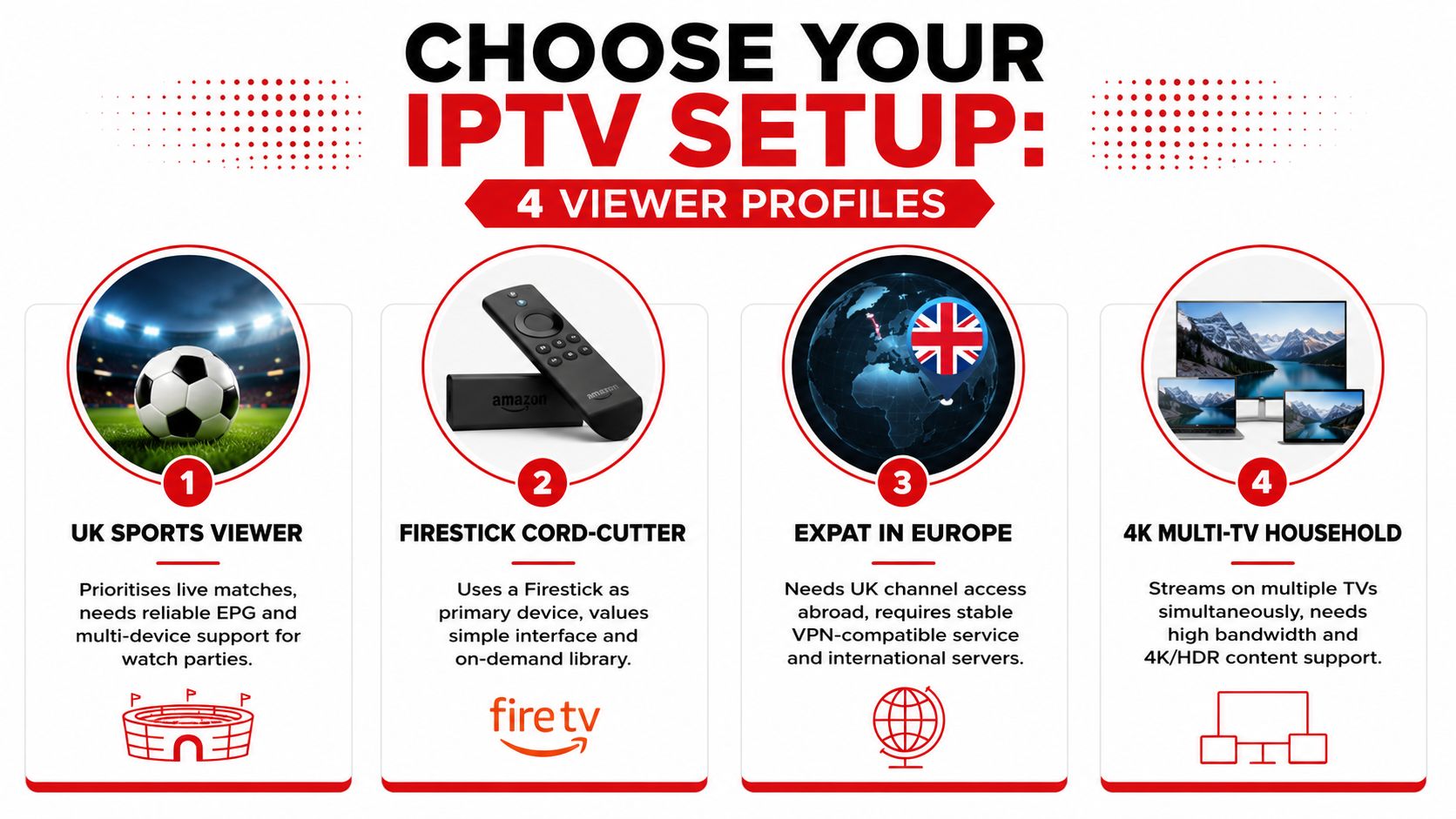
UK sports viewers
If you watch live football, F1, darts, or boxing, pick the most stable device you already own, then test it during an actual evening match window. Don't judge a provider at lunchtime, because that tells you almost nothing about peak-time behaviour. A short trial matters more here than a long subscription.
You want a setup that keeps live action steady, handles channel switching quickly, and doesn't fall apart when the household starts streaming other things at the same time. If the guide is sloppy or the stream takes too long to load, that's not a tiny inconvenience, it ruins match viewing.
Firestick-first cord-cutters
If you're using a Firestick as your main TV device, keep the setup simple. A clean interface beats a bloated feature list you'll never use, and a provider with a good app experience is more valuable than one that just boasts about channel count.
Expats wanting UK channels abroad
If you're outside the UK and want familiar channels, choose a service that behaves predictably on weaker or changing networks. The problem is often not the catalogue, it's keeping the stream stable while you move between countries, Wi-Fi networks, or VPN routes.
4K streamers with multiple TVs
If your household cares about UHD, use the strongest device and network path on the main screen, then don't spread the line too thin across extra rooms. A modern box on wired Ethernet will usually beat a flashy TV app on unstable Wi-Fi.
For a practical snapshot of how these profiles compare, the best move is to match your use case to the device and then test the stream under real conditions, not theoretical ones. If you want a service that lets you see whether your chosen setup works before you commit, that's the right standard to apply to every provider.
Fixing the IPTV Problems UK Viewers Hit
Most IPTV problems fall into a few clear buckets, and each one needs a different fix. Treat every fault as if it came from the same place, and you end up changing random settings while the true cause stays in place.
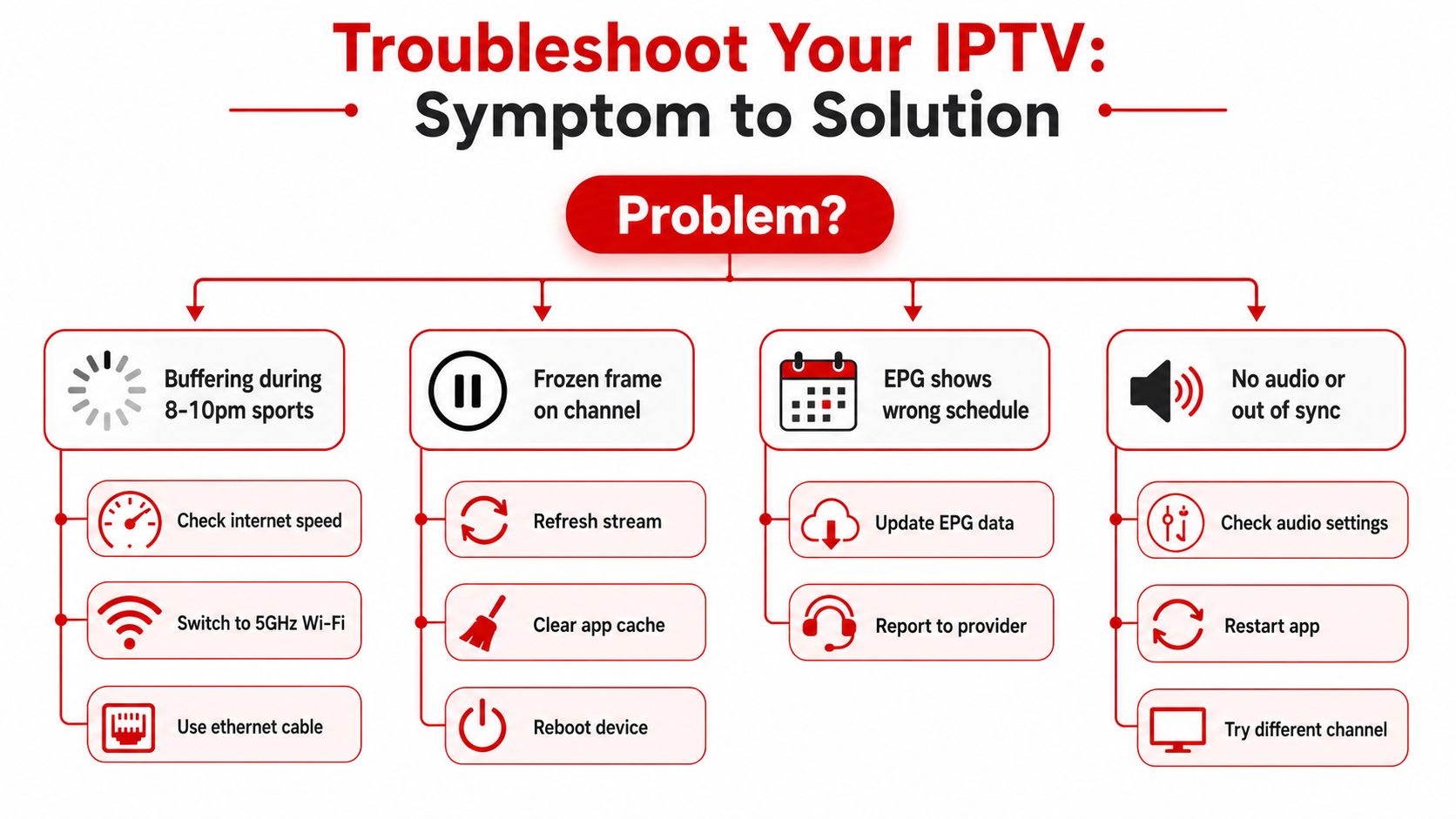
Match the symptom to the fix
- Buffering during 8 to 10 pm sports: the likely cause is evening congestion, weak Wi-Fi, or a device that can't keep up. Start with Ethernet. If that is not practical, move to 5 GHz Wi-Fi, then cut back other household traffic while the stream is live.
- Frozen frame on one channel: the problem is often a bad stream node or an app cache issue. Refresh the stream, clear the app cache, and reboot the device.
- EPG shows the wrong schedule: that usually means stale guide data. Update the EPG source and report the mismatch to the provider.
- No audio or sound out of sync: that is usually a player-side audio setting or a temporary app glitch. Check the audio output, restart the app, and test a different channel.
Use the router-side checklist before blaming the service
If the same device buffers every night, look at the home network first. Wired Ethernet is still the cleanest fix, and 5 GHz Wi-Fi is the next best option if running a cable is impractical.
QoS settings can help if your router handles them well, but an old router with overloaded firmware will still struggle. If you use a VPN, turn it off for a test. Routing overhead can reveal whether the problem is the tunnel or the stream itself.
The cleanest diagnostic is simple. Test one channel on one device with no other heavy use in the house. If it still fails, the problem is probably upstream. If it clears up, the bottleneck is inside your home network or device stack.
Crafted with Outrank